What's the Difference Between a Domain, DNS, and a Website?
Picture this: a Monday morning, and two clients have already called to say your website is down. Your inbox isn’t receiving new messages either. You call your hosting company. They say the problem is with your domain. You call your domain registrar. They tell you to check your DNS settings. You have no idea what any of this means, or who is actually responsible for fixing it.
This scenario plays out regularly for small businesses, and it usually comes back to the same misunderstanding: most business owners treat their online presence as a single thing when it’s actually three separate layers, a domain, a DNS configuration, and a hosting server. When one layer fails, the rest can stop working with it. Understanding those layers makes troubleshooting much faster.
Your Domain Is Your Address, Not Your House
A domain name is the human-readable address people type to find your business online. Something like yourbusiness.com or yourbusiness.net. It’s the label your customers use, and it’s what shows up in your email address when you use a business email account tied to your company name.
Here’s what surprises many business owners: you don’t actually own your domain. You register it, typically for one to ten years at a time, through a domain registrar like GoDaddy, Namecheap, or Google Domains. When that registration expires and you don’t renew, the domain becomes available for anyone else to register. Your website and business email go down the moment it lapses.
The domain by itself does nothing. It has no files, no content, and no email. It’s just a name. To make it useful, you need DNS to tell the internet where to send traffic, and you need a hosting server that actually stores your website.
There were 364.3 million registered domain names globally at the end of 2024.[1] Despite that, 27% of small businesses still don’t have a website at all.[2] For businesses that do have one, domain registration is often the most overlooked part of staying online, right up until the renewal notice gets ignored.
DNS Is the System That Makes Your Address Work
DNS stands for Domain Name System. It’s often described as the phone book of the internet: when you type a domain name, DNS looks up the corresponding numerical address, the IP address, of the server where that website or email actually lives, and routes your request there.[3]
Every time you visit a website, your browser is silently running a DNS lookup in the background. It happens in milliseconds,[3] so it’s invisible. Remove it, and nothing works.
DNS lives in records stored on nameservers. These records are the settings that tell the internet how to handle traffic for your domain. The ones most relevant to small businesses are:
A Record
This points your domain to the IP address of your hosting server. It’s what makes yourbusiness.com load your website.
MX Record
This tells email systems where to deliver messages sent to your domain. Without a correct MX record, emails sent to your business address either bounce or disappear.
CNAME Record
This creates an alias, for example directing www.yourbusiness.com to yourbusiness.com, or pointing a subdomain to a third-party tool.
TXT Record
Often used for email security settings such as SPF, DKIM, and DMARC, which help prevent your domain from being spoofed or used in phishing attacks. TXT records are also used by services like Google Search Console or Microsoft 365 to verify domain ownership.
When these records are wrong, outdated, or missing, the symptoms can look like your website is broken when the actual problem is one misconfigured line in a DNS settings panel. DNS changes also don’t take effect instantly. Because DNS data is cached at servers around the world, updates take time to propagate globally, typically 24 to 48 hours, and occasionally up to 72 hours.[4] That’s why changing hosting providers or updating DNS settings can cause temporary inconsistency where some visitors see the old site and others see the new one.
Your Website Lives on a Hosting Server
Web hosting is the service that actually stores your website files: the HTML, images, databases, video, and code that make up your site. A hosting server is a computer permanently connected to the internet, run by a hosting company, with your files sitting on it.
When DNS routes a visitor to your site, it sends them to that hosting server’s IP address. The server then reads the request, finds the right files, and sends them back to the visitor’s browser to display as a webpage.
Hosting and domain registration are often sold together by the same company, which creates the impression that they’re the same thing. They aren’t. You can register a domain with one company, use a completely separate hosting provider, and manage your DNS through a third service entirely. That flexibility is useful, but it also means three different vendors, three different logins, and three different renewal cycles to track.
How All Three Work Together, and What Breaks When One Fails
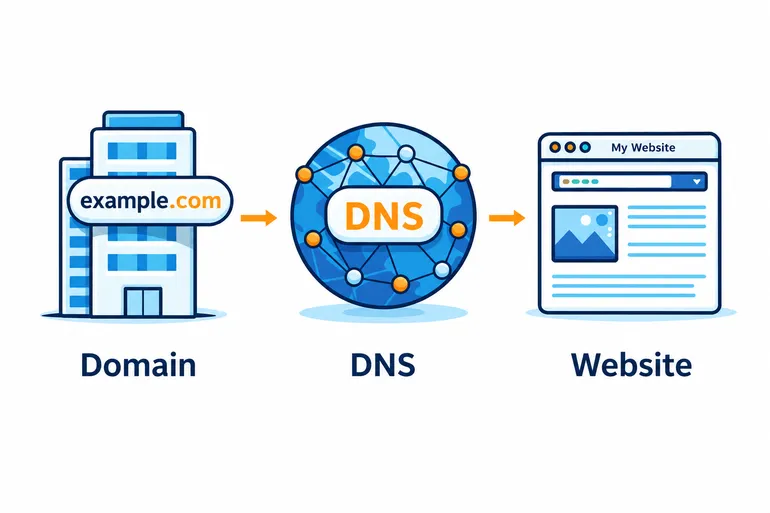
The chain looks like this: a visitor types your domain into their browser. DNS translates that domain into the IP address of your hosting server. The browser connects to that server. The server returns your website files. The visitor sees your site.
A failure anywhere in that chain can look the same from the outside, “the website is down,” even though the cause and the fix are completely different.
If your domain expires, DNS lookups fail immediately. Your website goes offline. So does your business email, any tools tied to your domain, and potentially your SSL certificate verification. Nothing works.
If your DNS records are misconfigured, say, an A record pointing to an old server after a hosting migration, your domain is active and your hosting server is running, but traffic can’t find its way between them. The result looks like an outage even though both pieces are technically working.
If your hosting server goes down, DNS resolves correctly, but there are no files at the other end to serve. The browser connects and gets nothing back.
DNS failure has an especially wide blast radius. Because DNS underpins nearly all internet-based communication, a problem there can disable your website, email, VoIP phone system, and any other domain-linked service all at once.[5] One issue in a settings panel can take down multiple business functions simultaneously.
Why This Matters More Than You Might Expect
For most businesses, this is purely background knowledge until something breaks. Then it becomes urgent, confusing, and expensive.
The more common problem is that no single person knows who controls what. The domain was registered years ago with one company. Hosting was set up by a web designer who no longer works with the business. DNS was managed by someone who left. When there is an outage, no one can log in to fix it because nobody knows where the accounts are or who has the credentials.
81% of consumers research businesses online before visiting or using their services.[2] A website that’s down during that research moment sends potential customers elsewhere. And 64% of consumers say they’re less likely to trust a business after experiencing a website outage.[6] The damage isn’t just lost traffic. It’s lost credibility.
For professional services businesses, law firms, accounting practices, and insurance agencies, the email dependency makes this even more acute. These businesses run on domain-based email. When DNS or domain registration fails, communication stops along with the website.
The fix isn’t complicated. Keep track of where each service lives and when registrations renew. Make sure at least one person in the business has admin access to the domain registrar, the DNS panel, and the hosting account. Treat domain renewal notices with the same urgency as a utility bill.
Getting It Under Control
Managing a domain, DNS, and hosting correctly isn’t especially difficult once the roles are clear. But it does require consistent attention to renewal dates, record accuracy, and account access, which often falls through the cracks in small businesses without dedicated IT support.
As part of managed IT services, Inter-Quest helps businesses keep track of these moving parts. We know where your domain lives, when it renews, who has access, and what your DNS records are supposed to say. When there is a problem, we’re not starting from scratch trying to figure out which vendor to call.
If you’re not sure who controls your domain, DNS, or hosting, or if you’ve had an outage you couldn’t fully explain, that’s a good place to start. Reach out to our team and we’ll help you get a clear picture of what you have and who’s responsible for keeping it running.
References
[1] DNIB.com Reports Internet Has 364.3 Million Domain Name Registrations at the End of the Fourth Quarter of 2024
[2] Top 50+ Small Business Website Statistics You Need To Know in 2025
[3] What is DNS? How DNS works
[5] Why DNS Has Become the Biggest Single Point of Failure in Digital Security